
Everyday usage · 4/10
Managers and Subordinates
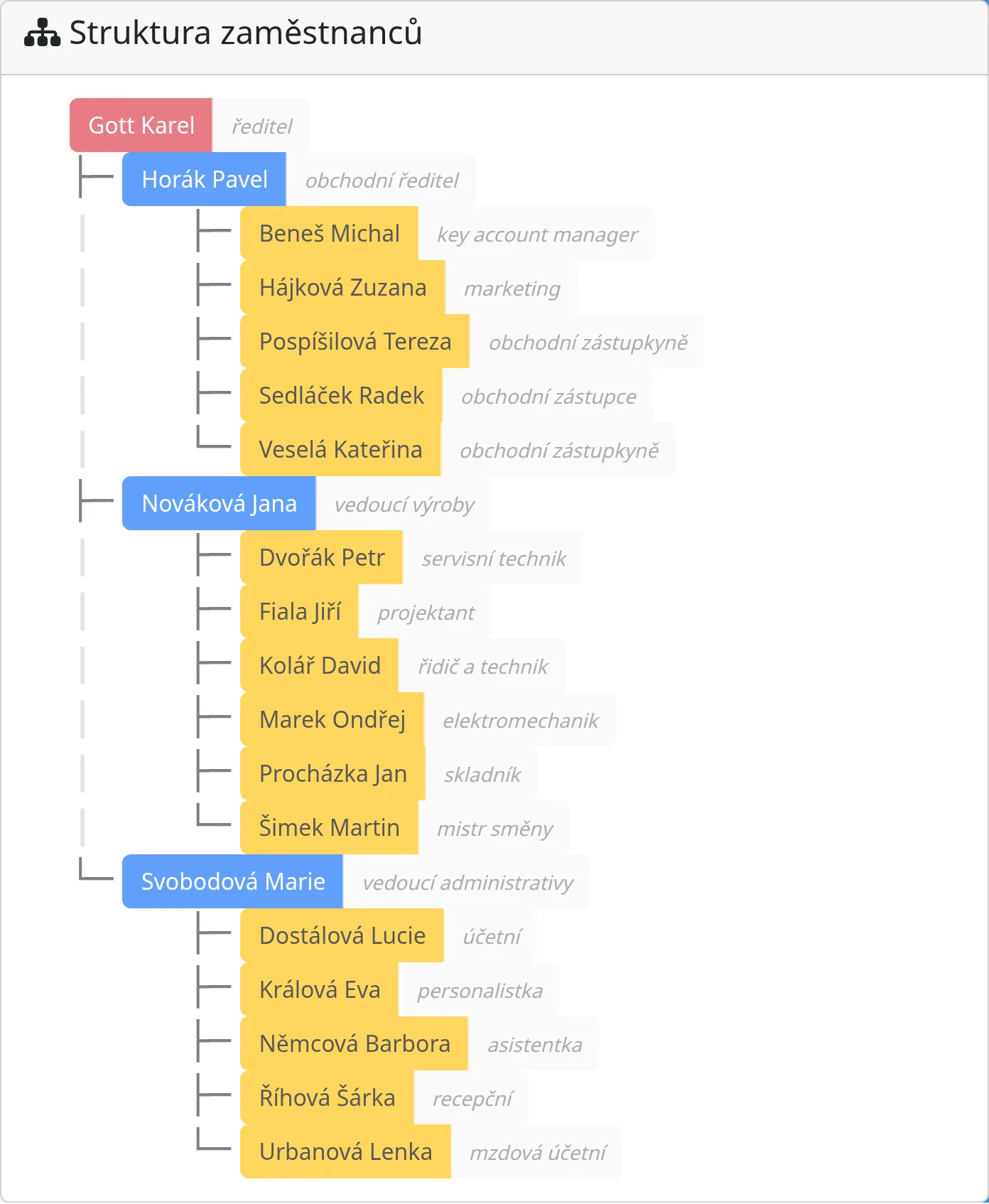
The system supports a hierarchy: every employee can have a manager, who sees their attendance and may correct it. This chapter explains what a manager sees and may do, how to set up the hierarchy, and how a manager differs from an administrator.
How to set a manager
- Admin → Employees, open the subordinate's profile.
- Employment tab, Manager field: choose an employee from the list.
- Save.
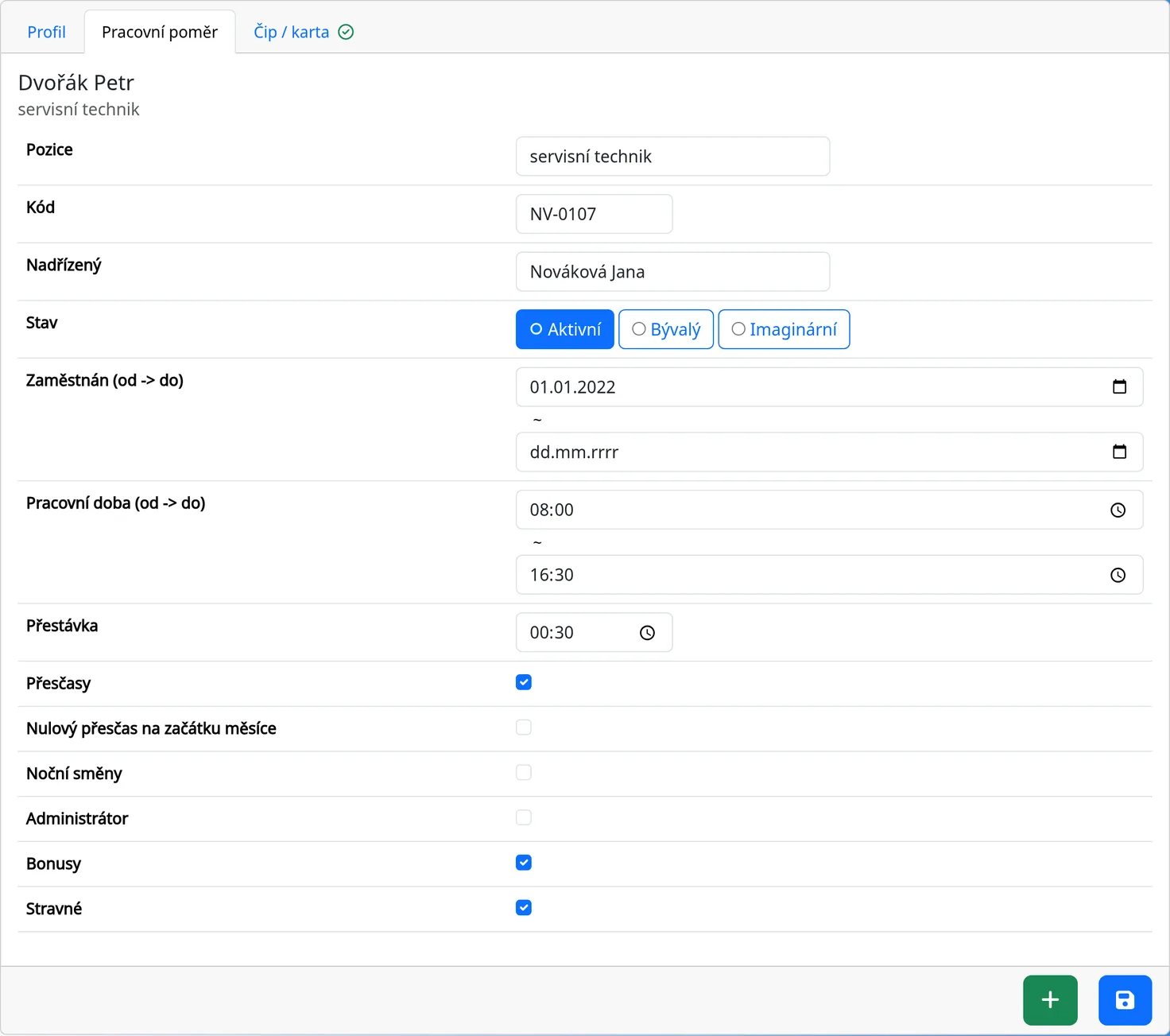
After saving, the system recalculates the subordinates for all employees. The hierarchy can have several levels: a manager sees their direct subordinates and their subordinates, all the way down.
You can see the company tree under “Reporty” → “Struktura zaměstnanců” (Reports → Employee structure). It shows only people who have a manager or subordinates.
What a manager sees
A manager is a regular employee who has at least one subordinate. They see:
- on the kiosk, clickable tiles for themselves and their subordinates (other tiles are gray),
- the attendance cards of themselves and their subordinates,
- in Reports, only themselves and their subordinates: Month list, “Všechny příchody” (All arrivals), Today arrivals and Yesterday arrivals, “Mé příchody” (My arrivals),
- in the “Zadat příchod/y” (Enter arrivals) dialog, themselves and their subordinates,
- in History, only the entries of themselves and their subordinates.
An administrator sees everyone. An employee without subordinates sees only themselves.
What a manager may do
- Correct or delete a card of their subordinate. If “Card editable by boss only” is on, only the manager and the administrator may do so. The employee then only reads the card.
- Record a subordinate's attendance on the kiosk and in the “Zadat příchod/y” dialog.
- Correct a subordinate's ride in the mileage log (Mileage Log chapter).
A manager has no right to manage employees, the system settings, cars or Infomails. Only an administrator may do those.
Approvals
The System screen has the System of approvals option, and each card has an “approved” flag. An approved card has no warning.
In practice, at the end of the month the manager checks each subordinate's monthly sheet, fixes errors and signs the sheet (the signature is on the PDF, if it is turned on).
Email summaries for managers
In the current version, the system does not send automatic email summaries.
Manager vs. administrator
| Manager | Administrator | |
|---|---|---|
| Sees employees | themselves and subordinates | everyone |
| Corrects cards | of subordinates | of everyone |
| Manages employees and the system | no | yes |
| Manages cars and Infomails | no | yes |
| Sees History | subordinates only | everything |
Tips
- An administrator does not need to be anyone's manager. Conversely, not every manager needs to be an administrator.
- If you change the manager, the new permissions apply immediately after saving.
- For a team leader, remember to set the leader as the manager of their subordinates, not of themselves.
Common problems
- The manager does not see a subordinate. Check that the correct manager is selected in the subordinate's profile.
- The manager cannot edit a card. Check that you really are this employee's manager (see How to set a manager). Otherwise only an administrator can edit the card.