
Everyday usage · 1/10
Kiosk Day to Day
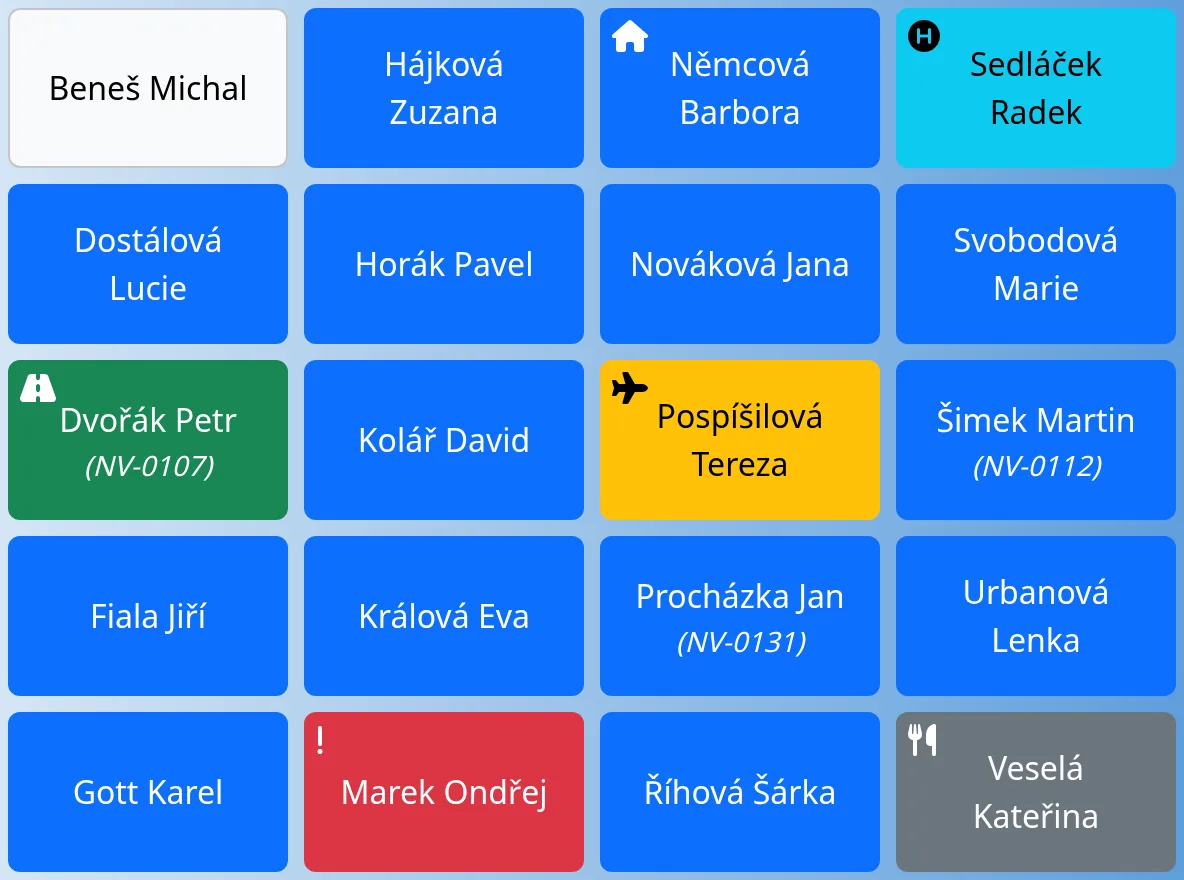
The kiosk is the main screen of the system. Employees use it to record an arrival, a leave, a break and other statuses with a single tap. This chapter describes what each button does to the attendance record (the card). The look of the tiles and the kiosk installation are in the first part of the guide.
Every status is a card
The system stores attendance as cards. A card has a type (Normal, Business trip, Doctor, Home office, Illness, Vacation, Payed day off, Day off, Break), an arrival time and a leave time. As long as a card has no leave, it is “active”. A tap on a tile always closes the current card and opens a new one, or just closes it.
Arrival
Tap the white tile with your name. The system closes any open card and opens a card of the type Normal with the current time. A tap on your tile behaves the same way when you are on vacation, ill, on a payed day off, working from home or on a business trip: a normal arrival at work is recorded. For a business trip, the previous card is closed and “returned from business trip” is recorded.
Leave
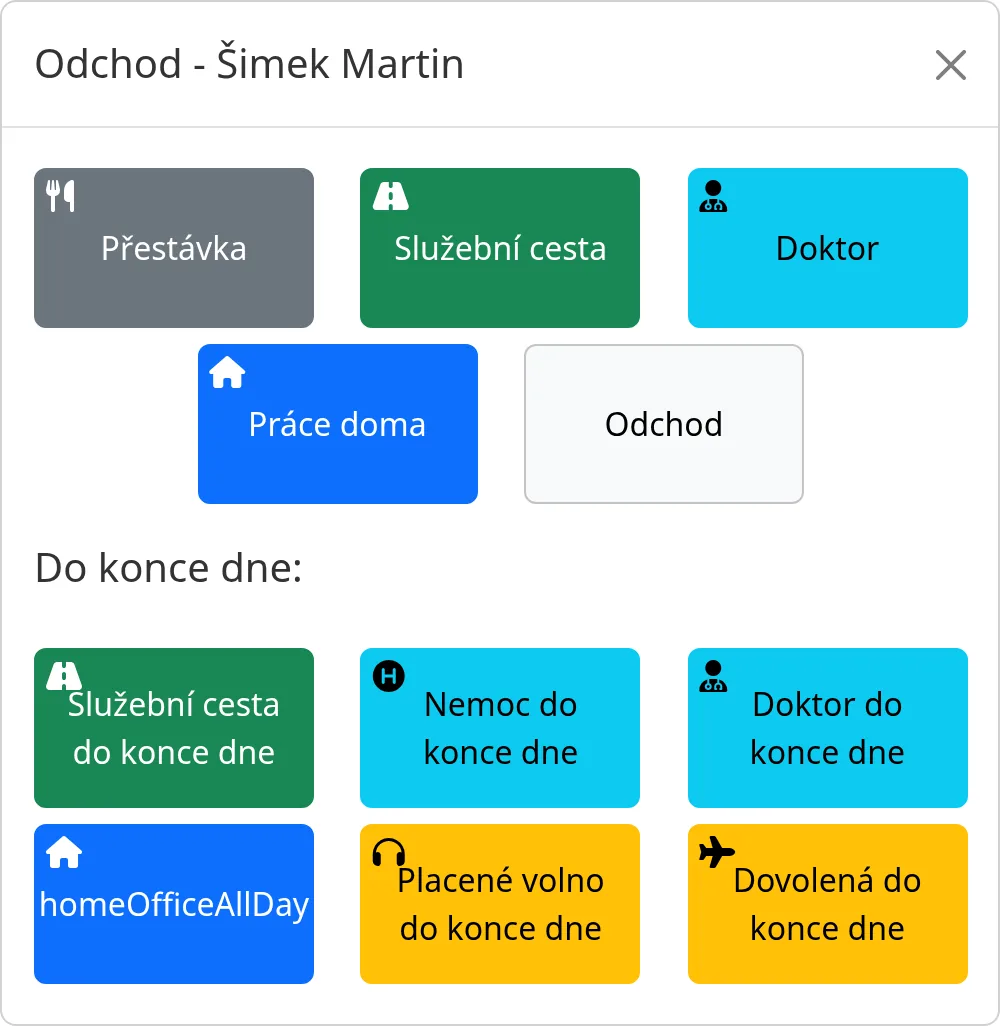
Tap the blue tile with your name. The window Leave – Name opens. The window has two rows of buttons.
The top row
It offers the usual actions. These are normally the following buttons:
- Break opens a new card of the type Break. The work card stays open and the break is counted within it. By tapping the gray tile you then choose Return from break, which closes the break.
- Business trip closes the card and opens a card of the type Business trip. You record the return by tapping the green tile.
- Doctor closes the card and opens a card of the type Doctor. After you tap the tile, the “Leave from doctor” window appears with the options “Arrival to work”, “Illness all day” and “Leave”.
- Home office closes the card and opens a card of the type Home office.
- Leave closes the current card with the current time.
The bottom row, “Until the day ends”
These buttons record a card of the given type and close it immediately. The card ends at the moment your shift would end according to your daily workload. If you have already worked your full workload, the card closes right away. The available buttons:
- Business trip all day
- Illness all day
- Doctor all day
- Home office all day
- Payed day off all day
- Vacation all day
After the window closes, the tile changes color and the action is also written to History.
Which buttons are offered
The list of buttons in both rows is determined by the system setting “Leave buttons”. It is not set in Admin → System. The operator changes it on request. The setting is written as the top row, two colons, the bottom row, for example break:outsideWork:doctor:homeOffice:leave::outsideWorkAllDay:illnessAllDay:doctorAllDay:homeOfficeAllDay:payedFreeDayAllDay:vacationAllDay. If your system has a different set, you see different buttons.
Day off has no button on the kiosk. You record it through “Zadat příchod/y” (Enter arrivals) or by changing the type of the card.
What each type does
| Type | What it means | Where it appears in the sheet summary |
|---|---|---|
| Normal | regular work at the workplace | Worked hours |
| Home office | working from home | Worked hours |
| Business trip | away from the workplace | Worked hours |
| Doctor | a doctor's visit | its own Doctor row |
| Illness | illness | its own Illness row |
| Vacation | vacation | its own Vacation row |
| Payed day off | payed day off, public holidays | its own Payed day off row |
| Day off | time off | its own Day off row |
| Break | a pause | the Break column |
Breaks are counted in a separate column of the sheet, if that column is turned on. The meal allowance applies only to the types Normal, Business trip and Home office.
Chips and hidden absence
When the chip mode is on, an employee can hold their chip to the reader instead of tapping. If the same chip is presented again while the Leave window is open, the leave is recorded immediately. In the “Access only via chip” mode, touch does not work (an administrator can always tap). If “Hide type of unattendance on entry tablets” is on, the kiosk shows vacation, illness and similar statuses only as a gray “Unattendant”.
Tips
- The screen refreshes every 30 seconds. There is no need to refresh it by hand.
- If you tap by mistake, fix the card in the attendance card (Attendance Cards chapter).
- A regular employee sees everyone's tiles but can tap only their own. Other people's tiles are gray.
Common problems
- A forgotten leave. The next day the tile is red with an exclamation mark. Tap it to open the card and fill in the leave.
- The tile responds slowly. Check the kiosk's internet connection. During an outage, “Connection error!” appears.