
Everyday usage · 9/10
Administration: Settings Overview
This overview lists all the system settings the application remembers for your company. Each setting gets one sentence. For each one we say where to find it: System means Admin → System (the tab is in parentheses), and operator means that you will not find the option on any screen and the system operator changes it at your request.
Only an administrator can open the System screen. Save changes with the floppy-disk icon. If two administrators edit at the same time, only what each person changed is saved.
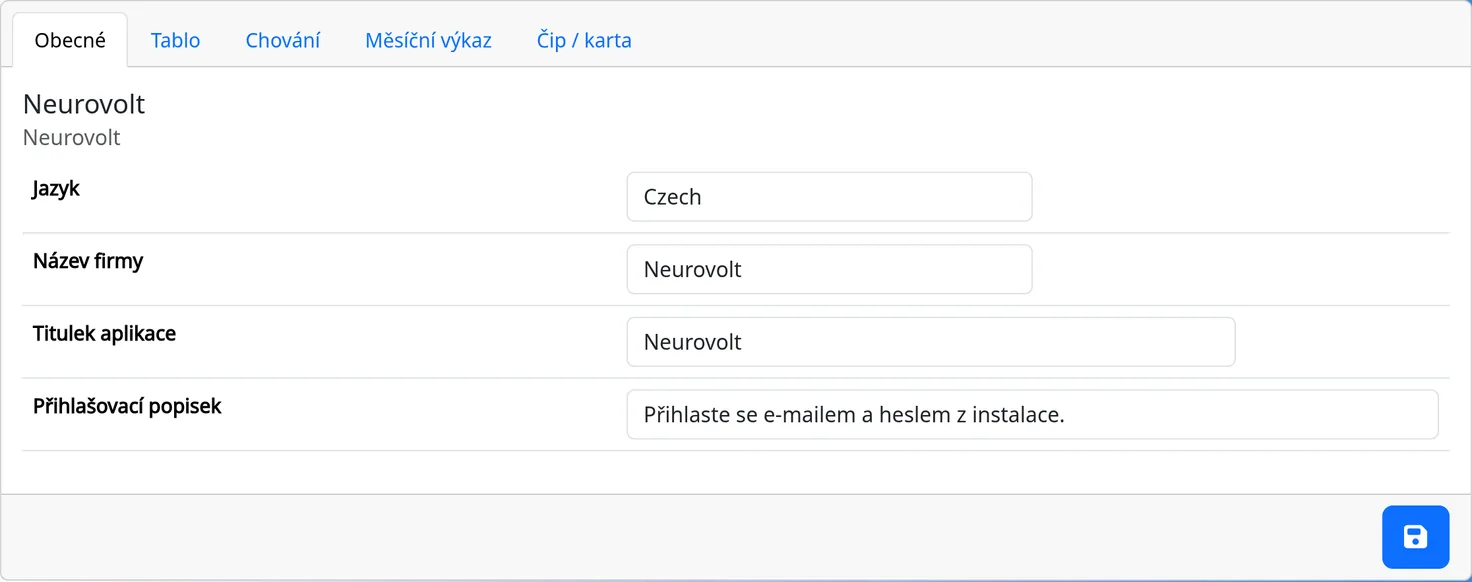
Basic
| Setting | Where | What it does |
|---|---|---|
Language (application_language) |
System (“Obecné”, General) | The interface language: Czech, English, German, Spanish. Czech and English are fully translated. |
Company name (company_official_name) |
System (“Obecné”) | The official company name, required. |
Application title (application_title) |
System (“Obecné”) | The heading in the top bar and on the sign-in page, required. |
Login description (application_loginDescription) |
System (“Obecné”) | The text below the sign-in form. Tags [b], [i], [u], [mail:…]. |
Button columns (employee_column_count) |
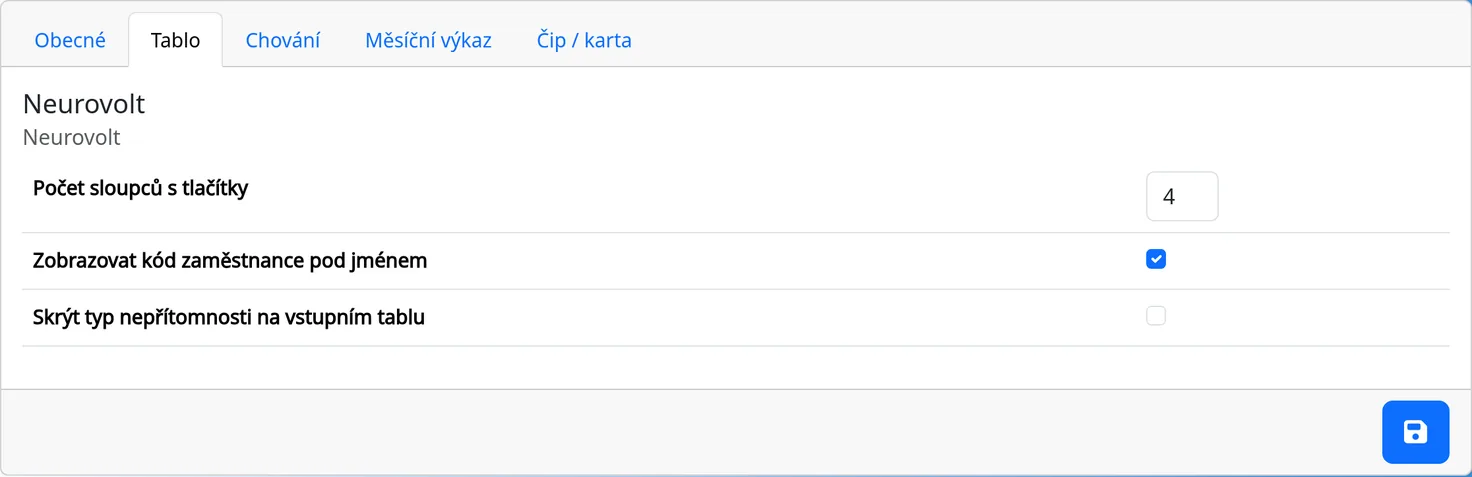
System (“Tablo”, Kiosk board) | The number of tile columns on the kiosk, 1 to 12. |
Show code on employee buttons (show_ExternalId) |
System (“Tablo”) | Shows the employee code under the name on the tile. |
Hide type of unattendance on entry tablets (MaskUnattendanceType) |
System (“Tablo”) | The kiosk shows vacation, illness and similar statuses as “Unattendant”. |
System name (company_name) |
operator | A short company identifier, identical to the system address. |
Version (application_version) |
operator | The version the system runs on. If a newer one exists, a notice is shown on the kiosk. |
Active (Active) |
operator | A disabled system does not appear and shows a message that it is disabled. |
Payment type, Paid until, Free until (PaymentType, PayedUntil, FreeUntil) |
operator | License records. |
Updates enabled (UpdatesEnabled) |
operator | A flag that allows system updates. |
Security, confirm every click (sec_enabled, sec_confirmEveryClick) |
operator | Older kiosk security options. |
Message to the administrator (AdminMessage) |
operator | A text message for administrators. |
Changing the licence
The free version is meant for at most 5 active employees. When you try to add or reactivate another one, the system does not save it and shows the message “You have reached the limit of 5 active employees of your licence. Choose a larger licence in the price list and request it.” The link “request it” opens a prefilled e-mail proposing a suitable larger licence, the same as the button described below. With a paid licence the limit is the number in its name, for example 60 for the licence “Annually – up to 60 employees”.
The Licence tab (Admin → System → Licence) shows the licence as a badge (grey for the free version, green for a paid one) and in words, the number of active employees (yellow from 90 % of the limit, red once it is reached), the day the licence is valid until (“no expiry” for the free version), the day of the last renewal, a link to the price list and the operator's address for renewals and questions.
You do not pick a higher licence yourself, and you do not create a new system for it, because your data would not be in it. The Licence tab has a Change licence to row with a button labelled with the nearest larger licence of the same billing period (annual for the free version), for example “Annually – up to 10 employees”. The arrow next to it opens the other larger licences, and the chosen one opens a prefilled e-mail to the operator ([email protected]) that you only need to send. Above the largest tier a Request a licence change button remains, and in the e-mail you write what you need. You can also write on your own.
The operator sends you an invoice and, once it is paid, switches the licence in your system. The new limit applies at once, and your data and settings stay as they are.
A paid licence has to be renewed before it ends. The system's administrators get an e-mail reminder 14 days before, 3 days before and on the last day of validity. After the licence ends, the system is blocked (“The licence has expired” is shown) until you renew it. Your data is kept, and after the renewal the system works as before.
Work time and overtime
| Setting | Where | What it does |
|---|---|---|
Work time from (workStartTime) |
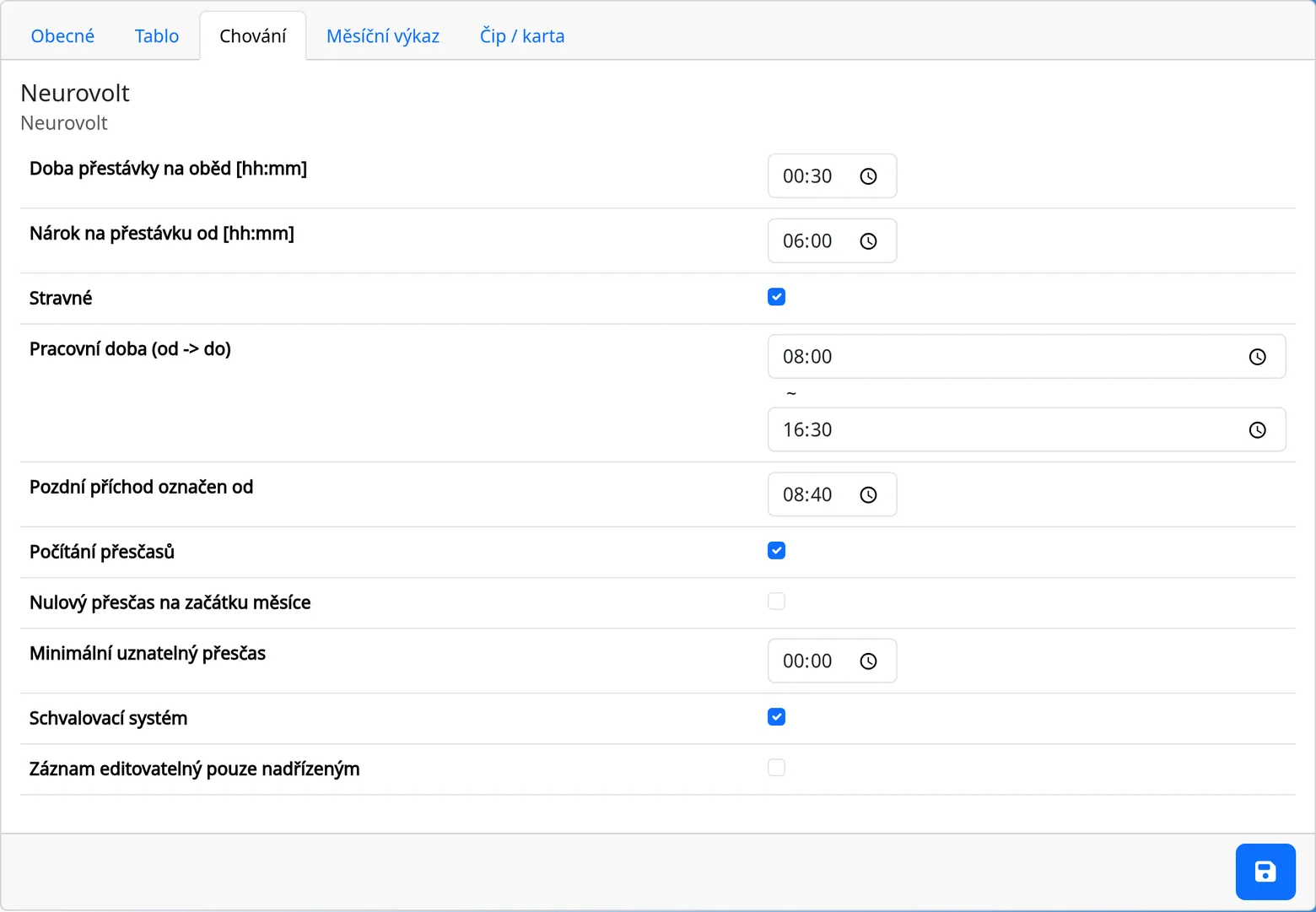
System (“Chování”, Behavior) | The default start of the working day for new employees and for the Enter arrivals dialog. |
Work time to (workEndTime) |
System (“Chování”) | The default end of the working day. |
Late arrival is marked from (arrivalLimitTime) |
System (“Chování”) | The time from which an arrival is late. |
Mandatory daily break [hh:mm] (LunchTime) |
System (“Chování”) | The default minimum break for new employees. |
Break substracted from [hh:mm] (LunchTimeValidFrom) |
System (“Chování”) | The time worked from which the minimum break is added. |
Break type (BreakType) |
operator | How breaks are recorded. |
Overtimes counted (OvertimeEnabled) |
System (“Chování”) | Turns on overtime. |
Overtime zero on the month begin (Overtime_ZeroFirstMonth) |
System (“Chování”) | Overtime is not carried over to the next month. |
Minimal overtime being approved (overtimeValidMin) |
System (“Chování”) | The smallest overtime that is accepted. |
System of approvals (approvals_needed) |
System (“Chování”) | Turns on approval of cards by managers. |
Card editable by boss only (editingDisabled) |
System (“Chování”) | Only an administrator and the manager may edit or delete a card. |
Ticket (TICKETS_enabled) |
System (“Chování”) | Turns on tracking of the meal allowance. |
See only subordinates (seeOnlySubordinates) |
operator | Limits visibility to subordinates. |
Kiosk and chips
| Setting | Where | What it does |
|---|---|---|
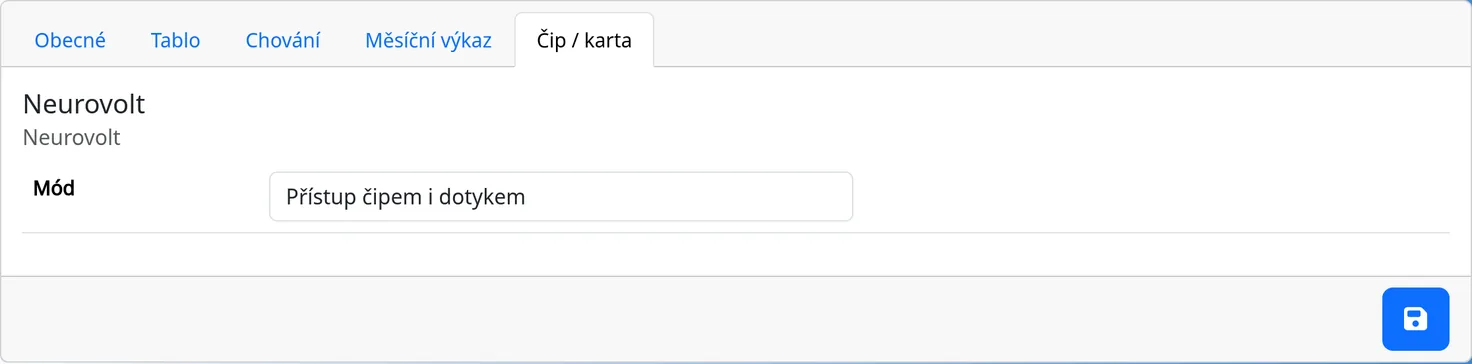
Chip mode (CHIP_mode) |
System (Chip / card) | Off, chip only, or chip and touch. |
Leave buttons (LeaveButtons) |
operator | Which options the Leave window offers. Written as top::bottom. |
| Button columns | System (“Tablo”) | See Basic. |
| Show code on employee buttons | System (“Tablo”) | See Basic. |
| Hide type of unattendance | System (“Tablo”) | See Basic. |
Reports
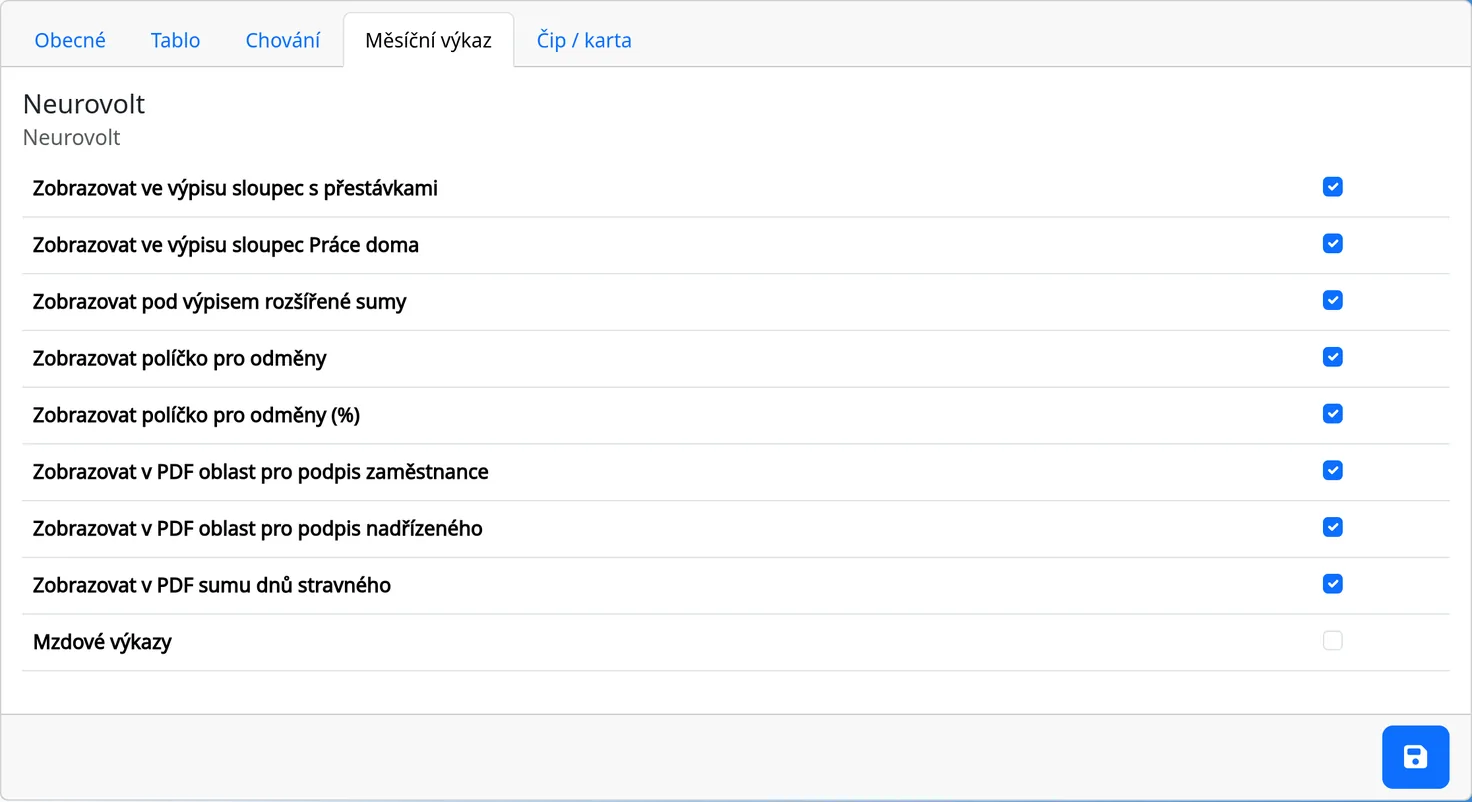
| Setting | Where | What it does |
|---|---|---|
Column with breaks (show_BreaksInList) |
System (Month list) | The Break column in the sheet. |
Home office column (show_homeOfficeInList) |
System (Month list) | The Home office column in the sheet. |
Advanced sums (show_FooterCountsInList) |
System (Month list) | Advanced sums under the sheet. |
Bonus field (show_bonus) |
System (Month list) | The Bonus field in the PDF footer. |
Bonus (%) field (show_bonus_percent) |
System (Month list) | The Bonus (%) field in the PDF footer. |
Employee's signature (show_EmployeeSignature) |
System (Month list) | The signature line in the PDF. |
Manager's signature (show_ManagerSignature) |
System (Month list) | The manager's signature line in the PDF. |
Sum of meal-allowance days (show_TicketsSum) |
System (Month list) | The total of meal-allowance days in the sheet and in the PDF. |
Zero lists enabled (ZeroReportEnabled) |
System (Month list) | Turns on the Wage list in the Reporty menu. |
Missing-day warning (show_missingDaysWarning) |
operator | A red “Missing day” badge on a working day without a card. |
Daily overtime in the sheet (show_dayOvertimeInList) |
operator | The Overtime today and Overtime sum columns. |
Email sending time (mailTime) |
operator | The time for automatic emails. |
Modules
| Setting | Where | What it does |
|---|---|---|
Cars module (CAR_enabled, CAR_mode, CAR_filler) |
operator | Flags of the mileage log module. The screens always appear. |
Infomail module (INFOMAIL_enabled) |
operator | A flag of the mass email module. The screen always appears. |
Export to other formats (PAMICA_enabled) |
operator | A flag of the export to other formats (payroll software). There is no screen for it in the application. |
Ticket (TICKETS_enabled) |
System (“Chování”) | See Work time and overtime. |
Billing details
| Setting | Where | What it does |
|---|---|---|
Street, City, Postal code, Country (Invoice_Street, Invoice_City, Invoice_Postal, Invoice_Country) |
operator | The company address for the invoice. |
Phone, E-mail (Invoice_Phone, Invoice_Email) |
operator | The billing contact. |
ID, VAT (Invoice_ICO, Invoice_DIC) |
operator | The company's identification numbers. |
Per-employee settings
More options are on each employee (Admin → Employees → Employment): Work time, Break, Overtimes, Zero overtime, Night shifts, Bonuses, Ticket, Administrátor (Administrator), Manager, State and Code. The Employees chapter describes them.
User management and permissions
- Administrator (Admin access): manages employees, the system, cars and Infomails, and sees all data.
- Regular employee (Normal access): sees themselves; a manager also sees their subordinates.
- Dummy employee: the kiosk only.
The special Divine access (unlimited permissions) is intended for the operator and is not set on any screen.